AI Receptionist for Small Business: 2026 Guide
I've watched businesses leave money on the floor for 25 years. Not by making bad products. Not by losing customers to better competitors. By simply not answering the phone.
In 2022, I worked with a home services contractor pulling in $800K a year. Solid operation. But they had one receptionist handling 200+ calls a week, working 9-to-5, taking lunch breaks, calling in sick. We pulled their call data. They were missing 31% of inbound calls. That's not a staffing problem, that's a revenue leak hiding in plain sight.
The fix exists. And in 2026, it costs less than your coffee budget relative to what you're losing.
An AI receptionist for small business is software that answers every inbound call, holds a real two-way conversation, books appointments, captures lead data, and routes inquiries, without a human on the line. Not a "press 1 for billing" menu. Not voicemail. A conversational system that sounds professional, responds intelligently, and never misses a call at 2 a.m. on a Saturday.
If you want to understand the true cost of missing calls as a small business, start there. What we're covering here is the full picture, what this technology is, what it costs, where it works, and where it fails.
Key Takeaways
27% of small business calls go unanswered, costing the average business $126,000/year, an AI receptionist running at $297–$1497/month directly recovers that revenue
A full-time human receptionist costs $42,000–$58,500 annually including benefits; a mid-range AI receptionist costs $1,188–$3,000/year, annual savings of $39,000–$55,500
The hybrid AI-plus-human model is the optimal strategy: AI handles 85–90% of standard calls. Humans manage emotionally complex or high-stakes escalations.
Setup takes under 24 hours for most platforms; no technical background required, you configure CRM and calendar integrations in Week 1
AI receptionists are not perfect, accent recognition gaps, complex emotional situations, and integration sync failures are real failure modes; always configure a human escalation path as a safety net

What Is an AI Receptionist? (Plain Language for Small Business Owners)
An AI receptionist is software that answers your business phone calls, engages callers in natural conversation, gathers information, books appointments, and routes inquiries, all without a human picking up the line.
That's the plain definition. But the distinction that matters is what it's not. It's not an auto-attendant ("press 2 to reach sales"). It's not a voicemail system. It uses natural language processing (NLP) to understand real, unpredictable speech, a caller saying, "Yeah, I need someone to look at my HVAC, it's making a grinding noise and I'm in the Westside area", and responds like a trained front-desk employee would.
Here's what separates modern platforms from the last generation: machine learning. Every call interaction trains the system. Edge cases get handled better in month three than they did in week one. Accuracy compounds. According to NIST's AI standards framework (opens in new tab), continuous learning systems show measurable performance gains when tested against consistent benchmarks. That's exactly the design goal of leading AI receptionist platforms.
And in 2026, these platforms don't just live on the phone. Most run simultaneously across voice, SMS, and web chat. A caller who hangs up can receive an SMS follow-up within 30 seconds. A website visitor can engage the same AI through a chat widget. One system, multiple channels, running in parallel.
That's what we mean by an AI voice agent handling inbound calls automatically, it's infrastructure, not a gimmick.
Why Small Businesses Need AI Receptionists in 2026
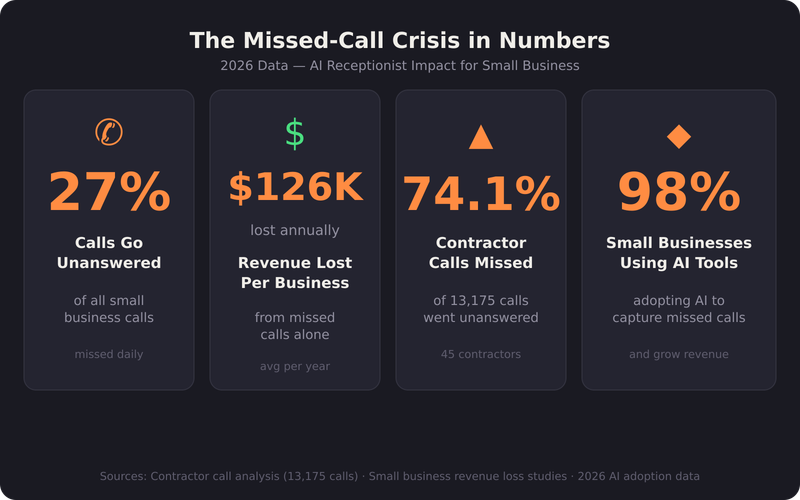
Small businesses need AI receptionists because 27% of calls go unanswered, costing the average business $126,000 per year in lost revenue. In 2026, 98% of small businesses already use AI-enabled tools. A virtual receptionist is no longer a luxury. It's the baseline expectation for competitive customer service.
That 27% figure might feel manageable in the abstract. It doesn't feel manageable when you do the math monthly. $126,000 a year is $10,500 a month in preventable revenue loss. That's not a rounding error. That's payroll.
The contractor data makes it visceral. NextPhone's analysis of 13,175 calls across 45 contractors found that 74.1% of those calls went completely unanswered. Not 27%. 74.1%.
The 27% national average is the optimistic number for many industries.
Here's the consumer behavior piece that makes it worse: 85% of callers who don't reach someone won't call back. They don't leave a message. They go to the next result on Google. Your competitor, who had an AI that picked up on the first ring, just booked that job.
The U.S. Chamber of Commerce's State of Small Business research (opens in new tab) confirms what the survey data shows: 98% of small businesses are now using AI-enabled tools. An automated call answering system isn't catching a wave early, it's catching up.
The economic case is clear. McKinsey's research on the economic potential of generative AI (opens in new tab) identifies customer operations, including front-desk and inbound call handling, as one of the highest-value automation opportunities available to businesses of any size. Small businesses, they note, are positioned to capture outsized gains relative to their cost base.
27%
of all small business calls go unanswered, the single largest source of preventable revenue loss in 2026
$126K
average annual revenue lost by small businesses from missed calls alone
74.1%
of calls to 45 contractors went completely unanswered in a 13,175-call analysis, the crisis is systemic
98%
of small businesses now use AI-enabled tools, an AI phone receptionist is the next logical layer
Want this handled without hiring for it? Luna is our AI operator. She picks up every call live, works every new lead the way you tell her to, and follows up inside the tools you already use.
Human Receptionist vs. AI Receptionist: Real Cost Comparison
Let me put real numbers on this comparison, because most guides either skip it entirely or use ranges so wide they're useless.
A full-time human receptionist runs $35,000–$45,000 in base salary. Add benefits, employer taxes, and training overhead, call it 20–30% on top, and your effective annual cost lands between $42,000 and $58,500. The Bureau of Labor Statistics Occupational Employment data for receptionists and information clerks (opens in new tab) confirms median annual wages in this range. Total compensation costs consistently run 25–32% above base salary once employer-side costs are included. And that's before turnover. The average receptionist tenure is 2.3 years. Replacing one costs 50–75% of their annual salary, $17,500–$33,750 every 2–3 years, just to get back to baseline.
Now look at the AI side. Trillet offers entry-level AI receptionist functionality starting at $49/month. Mid-range platforms, CRM integration, appointment scheduling, analytics, run $297–$1497/month. Enterprise configurations with custom integrations and dedicated support land at $797–$1497/month, per Ringly.io's 2026 pricing analysis.
At $797/month, a mid-range AI plan, your annual spend is $7,970. Against $42,000–$58,500 for a human, that's a savings of $39,000–$55,500 per year.
Cost Type | Human Receptionist | AI Receptionist (Mid-Range) |
|---|---|---|
Annual Base Cost | $35,000–$45,000 | $1,188–$3,000/yr |
Benefits / Overhead | $7,000–$13,500 | $0 |
Turnover Cost (amortized) | $7,600–$14,700/yr | $0 |
Total Effective Annual Cost | $42,000–$58,500 | $1,188–$3,000 |
Annual Savings vs. Human | , | $39,000–$57,312 |
The break-even math is simple: at $149/month, you need to capture just 1–2 additional leads per month, assuming an average deal size of $150–$500, to fully cover your AI cost. Everything beyond that is margin recovered.
The hybrid model, AI as the primary handler with part-time human backup for complex situations, runs $500–$2,500/month. Still 60–90% cheaper than full-time human coverage, with better hours and zero turnover. Harvard Business Review's research on human-machine collaboration in service roles (opens in new tab) consistently finds that hybrid models outperform both fully automated and fully human-staffed configurations on customer satisfaction and cost efficiency. The pattern: AI handles high-volume routine interactions, humans manage complex escalations.
AI receptionist small business, The missed-call crisis in numbers, 2026 data
How AI Receptionists Work: The Technical Foundation (Without the Jargon)
You don't need to understand transformer architecture to deploy an AI receptionist. But you do need to understand the three layers that determine whether a platform performs or underperforms for your specific business.
Layer 1: Speech Recognition and Natural Language Processing
This is how the system hears and understands the caller. Modern platforms use large language models (LLMs) trained on billions of voice interactions. The practical result: the system can parse regional accents, interrupted sentences, background noise, and non-standard phrasing. NIST's AI Risk Management Framework (opens in new tab) identifies speech recognition accuracy and bias across accent and demographic groups as a primary evaluation criterion for conversational AI, a standard the leading platforms now actively test against.
Layer 2: Business Logic and Decision Routing
This is where your business rules live. What happens when someone calls about an emergency? What if they ask about pricing? What if they want to cancel? The platform maps caller intent to configured responses and actions. The sophistication gap between entry-level and enterprise platforms shows up most here.
Layer 3: Integration and Data Capture
This is the layer that connects the AI to your existing tools, your calendar, your CRM, your practice management software. Real-time calendar syncing and lead capture automation are now standard features on mid-range platforms. Integration quality is what determines whether your AI receptionist is a standalone tool or a genuine operational layer in your business.
Which Small Businesses Benefit Most from AI Receptionists?
Not every business has identical call dynamics. ROI shifts based on call volume, average transaction value, and the complexity of interactions your business handles.
Highest ROI: Trade and Home Services
Plumbers, HVAC contractors, electricians, roofers. High average job values ($300–$2,000+), time-sensitive inbound calls, significant after-hours volume. And, as the 74.1% unanswered call rate in contractor data confirms, systemic call handling failures across the industry. CallDispatcher's analysis puts average lost revenue per missed contractor call at $450, with a typical 100-call-per-week service business losing over $160,000 annually from unanswered calls. The ROI case writes itself.
High ROI: Health and Wellness
Dental practices, med spas, physical therapy clinics, chiropractors. Appointment-driven businesses where every no-show is a double loss, lost revenue plus a blocked slot. AI receptionists reduce no-shows by up to 87% through automated confirmations and reminders. The Office of the National Coordinator for Health IT (opens in new tab) tracks patient communication technology adoption and notes that automated appointment management directly correlates with reduced administrative burden and improved patient retention in small practice settings.
High ROI: Legal and Professional Services
Solo and small-firm attorneys, accountants, financial advisors. High per-client value, significant after-hours inquiry volume, and strong preference for immediate response. AI receptionists provide consistent, professional responses to every caller without the variability of human staff, critical in industries where first impressions directly affect conversion.
Moderate ROI: Retail and Hospitality
Salons, spas, restaurants, boutique retail. Lower average transaction values reduce the per-missed-call revenue impact, but appointment scheduling automation and after-hours booking capture still generate meaningful returns. The Underdog Engine analysis specifically identifies hair salons and restaurants as businesses structurally unable to afford missed leads given thin margins and high fixed costs.
Lower ROI (But Still Viable): B2B Service Firms
Marketing agencies, consulting firms, IT service providers. Lower inbound call volume and longer sales cycles reduce the direct revenue recovery case. But professional consistency and after-hours lead capture still add value. The calculus shifts toward brand impression and lead qualification rather than appointment volume.
AI Receptionist Limitations: Where the Technology Fails
I'm not going to sell you on a technology by hiding its failure modes. Here's where AI receptionists break down, and what you do about it.
1. Accent and Dialect Recognition Gaps
Despite significant improvement, current-generation AI receptionists still show degraded accuracy with heavy regional accents, non-native English speakers, and callers with speech impediments. This isn't a minor issue if your customer base includes significant linguistic diversity. Mitigation: test the platform with representative voice samples before full deployment, and configure a human escalation path for callers who express frustration or repeat themselves multiple times.
2. Emotionally Complex Situations
A caller who is angry, grieving, confused, or in crisis needs a human. AI receptionists can detect sentiment markers and escalate, but the detection isn't perfect. An AI responding to a distressed caller with a scripted booking prompt is a brand-damaging failure. Harvard Business Review's analysis of AI customer service failures (opens in new tab) identifies emotional misreading as the highest-impact failure mode in voice AI, not technical errors, but contextual ones. Mitigation: configure escalation triggers for elevated emotion markers, and train the system to offer a human callback proactively when sentiment signals spike.
3. Integration Sync Failures
Calendar and CRM integrations are only as reliable as the APIs connecting them. Sync delays, double-bookings, and data dropouts are real risks, especially when platforms update on different schedules. Mitigation: audit your integrations weekly during the first 60 days; set up automated alerts for sync failures.
4. Edge Case Handling
AI receptionists perform excellently on the 80% of calls that follow predictable patterns. The other 20%, unusual requests, multi-part inquiries, callers who shift topics mid-conversation, expose the limits of current NLP. Mitigation: review call transcripts weekly during the first month to identify recurring edge cases, then update your business logic configuration to address them.
5. Regulatory and Compliance Exposure
In healthcare, legal, and financial services, AI-handled calls may generate compliance obligations around call recording disclosure, data handling, and consent. The FTC's guidance on AI-generated voice and disclosure requirements (opens in new tab) is evolving rapidly. Mitigation: confirm with your platform vendor that their call disclosure language meets your state's requirements, and consult your attorney before deploying in regulated industries.
How to Implement an AI Receptionist: A Practical 30-Day Roadmap
Most platforms can be configured in as little as 5 minutes. A production-ready deployment, one actually optimized for your business rather than running on default settings, takes 2–4 weeks to dial in. Here's the honest roadmap.
Week 1: Foundation Setup (Days 1–7)
Select your platform based on the criteria above
Configure your business identity: name, hours, service area, key services
Set up call routing rules: what happens for new leads vs. existing customers vs. emergencies
Connect your calendar integration and test with 3–5 real booking scenarios
Record or upload your business-specific FAQs (pricing, service areas, common questions)
Run 10–15 test calls covering your most common inbound scenarios
Week 2: CRM Integration and Lead Capture (Days 8–14)
Connect your CRM (HubSpot, Salesforce, or your field service platform)
Configure lead data capture fields: caller name, number, service requested, preferred callback time
Set up automated SMS follow-up for missed calls or after-hours contacts
Test lead data flow end-to-end: call → capture → CRM entry → notification
Week 3: Live Deployment with Monitoring (Days 15–21)
Go live on a single phone line initially (not your primary number if you have multiple)
Review 100% of call transcripts during this week
Flag every call where the AI gave an incorrect or incomplete response
Update your business logic configuration to address gaps
Monitor for integration sync issues daily
Week 4: Optimization and Expansion (Days 22–30)
Expand to full call volume if Week 3 performance is satisfactory
Set up your analytics dashboard: answer rate, booking rate, escalation rate, missed call rate
Establish your weekly review cadence: 30-minute transcript audit, metric review, configuration update
Configure escalation protocols for the edge cases identified in Week 3
The Math Isn't Close
Three numbers decide this.
$126,000, what the average small business loses annually to missed calls.
$1,788, what a mid-range AI receptionist costs annually.
$124,212, the gap between those two numbers.
The technology isn't perfect. Accent gaps are real. Emotional edge cases require human judgment. Integration failures require monitoring. But the alternative, a staffing model that leaves 27–74% of your inbound calls unanswered, isn't a defensible business decision in 2026.
The SBA's small business technology adoption research consistently shows that businesses adopting workflow automation tools outperform peers on revenue retention and customer satisfaction. An AI phone answering system isn't a future investment. It's a current revenue recovery tool.
Deploy it. Monitor it. Fix the gaps. Every week you wait is another $2,400 in missed calls you're not getting back.
Written by
Gary Henderson
Founder of Gary Club
Keep reading